In the rapidly evolving landscape of cloud computing, ensuring resources remain secure and compliant is a constant challenge. After discovering some security misconfigurations in our team's AWS environment that went unnoticed for weeks, I decided to build an automated solution. This blog chronicles my journey creating a serverless AWS resource compliance monitor that continuously checks EC2 and S3 resources for security issues, automatically remediates common problems, and alerts on critical findings.
Project Vision: Automating Security Compliance
My goal was to create a fully serverless solution that could:
- Automatically scan AWS resources (S3 buckets, EC2 instances, security groups, EBS volumes) for security vulnerabilities
- Remediate common issues automatically without human intervention
- Alert administrators about critical security vulnerabilities that need manual attention
- Track compliance status over time with detailed reporting
- Visualize security posture through custom CloudWatch dashboards
All of this needed to be cost-effective, scalable, and with minimal operational overhead - a perfect use case for serverless architecture.
Phase 1: Building the Core Compliance Scanner
I started by developing the core Lambda function that would scan AWS resources for compliance issues. This function would be the heart of the system, analyzing resources against a set of security rules.
Challenge #1: Lambda Execution Role Permissions
My first challenge appeared immediately: the Lambda function needed broad permissions to inspect resources across different AWS services, but following the principle of least privilege meant I couldn't just give it admin access. When I initially ran the function with minimal permissions, I kept getting Access Denied errors for various API calls.
Solution:
I carefully analyzed each API call the scanner would need to make and created a custom IAM role with precisely scoped permissions. This included read-only access to specific services (EC2, S3) for scanning, but also write access to DynamoDB for storing findings and CloudWatch for metrics.
The policy ended up looking something like this:
{
    "Version": "2012-10-17",
    "Statement": [
        {
        "Effect": "Allow",
        "Action": [
            "logs:CreateLogGroup",
            "logs:CreateLogStream",
            "logs:PutLogEvents"
        ],
        "Resource": "arn:aws:logs:*:*:*"
        },
        {
        "Effect": "Allow",
        "Action": [
            "s3:ListBucket",
            "s3:GetObject",
            "s3:PutObject"
        ],
        "Resource": [
            "arn:aws:s3:::aws-compliance-monitor-bucket-name",
            "arn:aws:s3:::aws-compliance-monitor-bucket-name/*"
        ]
        },
        {
        "Effect": "Allow",
        "Action": [
            "dynamodb:PutItem",
            "dynamodb:GetItem",
            "dynamodb:Query",
            "dynamodb:Scan",
            "dynamodb:UpdateItem",
            "dynamodb:GetRecords",
            "dynamodb:GetShardIterator",
            "dynamodb:DescribeStream",
            "dynamodb:ListStreams"
        ],
        "Resource": [
            "arn:aws:dynamodb:*:*:table/ComplianceFindings",
            "arn:aws:dynamodb:us-east-1:88743xxxxxxx:table/ComplianceFindings/stream/2025-04-29T13:24:13.534"
        ]
        },
        {
        "Effect": "Allow",
        "Action": [
            "sns:Publish"
        ],
        "Resource": "arn:aws:sns:*:*:*"
        },
        {
        "Effect": "Allow",
        "Action": [
            "ec2:DescribeSecurityGroups",
            "ec2:DescribeVolumes",
            "ec2:DescribeInstances"
        ],
        "Resource": "*"
        }
    ]
}
This approach ensured the function had exactly the permissions it needed - no more, no less.
Phase 2: Implementing Resource Scanning Logic
With permissions resolved, I moved on to implementing the actual scanning logic. I decided to focus on the most critical security checks first:
Challenge #2: S3 Bucket Encryption Status
One of my first compliance checks was ensuring all S3 buckets had default encryption enabled. However, when testing, I discovered the AWS API returns encryption information in different formats depending on the encryption type, making it difficult to determine if a bucket was properly encrypted.
Solution:
I created a robust function to handle all possible responses from the get_bucket_encryption API call, including properly catching the specific exception thrown when encryption isn't enabled at all.
def check_s3_encryption(s3_client, bucket_name):
"""
Check if S3 bucket has default encryption enabled
"""
findings = []

try:
    s3_client.get_bucket_encryption(Bucket=bucket_name)
    # If we get here, encryption is enabled
except s3_client.exceptions.ClientError as e:
    if 'ServerSideEncryptionConfigurationNotFoundError' in str(e):
        findings.append({
            'issue': f"Bucket {bucket_name} does not have default encryption enabled",
            'severity': 'HIGH',
            'recommendation': "Enable default encryption on the S3 bucket"
        })

# Check for public access
try:
    public_access = s3_client.get_public_access_block(Bucket=bucket_name)
    block_config = public_access['PublicAccessBlockConfiguration']

    if not all([
        block_config.get('BlockPublicAcls', False),
        block_config.get('BlockPublicPolicy', False),
        block_config.get('IgnorePublicAcls', False),
        block_config.get('RestrictPublicBuckets', False)
    ]):
        findings.append({
            'issue': f"Bucket {bucket_name} does not have all public access blocks enabled",
            'severity': 'CRITICAL',
            'recommendation': "Enable all public access blocks on the S3 bucket"
        })
except s3_client.exceptions.ClientError:
    findings.append({
        'issue': f"Bucket {bucket_name} does not have public access blocks configured",
        'severity': 'CRITICAL',
        'recommendation': "Enable public access blocks on the S3 bucket"
    })

return findings
Challenge #3: EC2 Security Group Rules Analysis
Analyzing security group rules proved more complex than expected. I needed to identify overly permissive rules (like 0.0.0.0/0 allowed on sensitive ports), but the nested structure of security group data and the need to analyze CIDR blocks made this challenging.
Solution:
I developed a comprehensive security group analyzer that could identify several types of risky configurations. The function checked for:
- Public access to sensitive ports (SSH, RDP, database ports)
- Overly permissive outbound rules
Here's a snippet of the security group checking logic:
def check_security_groups(security_group):
"""
Check security group for compliance issues
"""
findings = []

# Check for overly permissive inbound rules
for rule in security_group['IpPermissions']:
    for ip_range in rule.get('IpRanges', []):
        cidr = ip_range.get('CidrIp', '')
        if cidr == '0.0.0.0/0':
            port_range = ""
            if rule.get('FromPort') == rule.get('ToPort'):
                port_range = f"port {rule.get('FromPort')}"
            elif rule.get('FromPort') is not None and rule.get('ToPort') is not None:
                port_range = f"ports {rule.get('FromPort')}-{rule.get('ToPort')}"

            protocol = rule.get('IpProtocol', 'all')
            if protocol == '-1':
                protocol = 'all'

            severity = 'MEDIUM'
            if rule.get('FromPort') in [22, 3389] or protocol == 'all':
                severity = 'CRITICAL'

            findings.append({
                'issue': f"Security group {security_group['GroupId']} allows {protocol} traffic on {port_range if port_range else 'all ports'} from any IP (0.0.0.0/0)",
                'severity': severity,
                'recommendation': "Restrict the security group rules to specific IP ranges"
            })

return findings
What I Learned:
Security scanning is full of edge cases. It's important to test thoroughly with a variety of real-world resources to ensure your scan logic handles all scenarios. I now maintain a test environment with deliberately misconfigured resources to validate my scanner's detection capabilities.
Phase 3: Building the DynamoDB Storage Layer
With scanning logic in place, I needed a way to persist findings for historical tracking and remediation. DynamoDB was the natural choice for a serverless architecture.
Solution:
To create DynamoDB table I ran the below commad in AWS cli
- Partition Key: ResourceId (e.g., bucket name or instance ID)
- Sort Key: FindingTimestamp#RuleId (to enable time-series querying for specific rules)
- Global Secondary Index on Status and Severity for filtering critical open findings
This model allowed for efficient queries when generating reports or looking up the history of a specific resource.
aws dynamodb create-table \
--table-name ComplianceFindings \
--attribute-definitions AttributeName=ResourceId,AttributeType=S AttributeName=CheckTimestamp,AttributeType=S \
--key-schema AttributeName=ResourceId,KeyType=HASH AttributeName=CheckTimestamp,KeyType=RANGE \
--billing-mode PAY_PER_REQUEST
Phase 4: Implementing Auto-Remediation Logic
One of the most valuable features of the system would be automatic remediation of common issues. This would reduce the manual workload on the security team and ensure quick resolution of non-critical findings.
Challenge #5: Safe Remediation Logic
I needed to ensure that automatic remediation would never break production resources or cause outages. Some remediation actions, like enabling bucket encryption, are safe, but others could potentially impact running workloads.
Solution:
I implemented a tiered remediation approach with varying levels of automation based on risk:
- Automatic: Safe changes like enabling S3 bucket encryption or blocking public access
- Scheduled: Medium-risk changes that run during maintenance windows
- Manual: High-risk changes that generate alerts for human intervention
Each remediation function included pre-checks to verify it could safely run and post-checks to confirm the change was successful.
Here's an example of a safe remediation function for enabling S3 bucket encryption:
import boto3
import json
import os

# Initialize AWS clients
s3_client = boto3.client('s3')
ec2_client = boto3.client('ec2')
dynamodb = boto3.resource('dynamodb')

# Get environment variables
findings_table = dynamodb.Table(os.environ['FINDINGS_TABLE_NAME'])

def lambda_handler(event, context):
    """
    Remediate compliance issues based on findings
    """
    remediated_count = 0

    # Process records from DynamoDB stream
    for record in event.get('Records', []):
        if record['eventName'] != 'INSERT':
            continue

        finding = record['dynamodb']['NewImage']
        resource_id = finding['ResourceId']['S']
        resource_type = finding['ResourceType']['S']
        issue = finding['Finding']['S']

        # Attempt remediation based on resource type
        remediated = False

        if resource_type == 'S3' and 'default encryption' in issue:
            remediated = remediate_s3_encryption(resource_id)
        elif resource_type == 'S3' and 'public access blocks' in issue:
            remediated = remediate_s3_public_access(resource_id)

        # Update the finding status if remediated
        if remediated:
            remediated_count += 1
            findings_table.update_item(
                Key={
                    'ResourceId': resource_id,
                    'CheckTimestamp': finding['CheckTimestamp']['S']
                },
                UpdateExpression="set #status = :s, Remediated = :r",
                ExpressionAttributeNames={
                    '#status': 'Status'
                },
                ExpressionAttributeValues={
                    ':s': 'REMEDIATED',
                    ':r': True
                }
            )

    return {
        'statusCode': 200,
        'body': json.dumps({
            'remediated_count': remediated_count
        })
    }

def remediate_s3_encryption(bucket_name):
    """
    Enable default encryption on S3 bucket
    """
    try:
        s3_client.put_bucket_encryption(
            Bucket=bucket_name,
            ServerSideEncryptionConfiguration={
                'Rules': [
                    {
                        'ApplyServerSideEncryptionByDefault': {
                            'SSEAlgorithm': 'AES256'
                        },
                        'BucketKeyEnabled': True
                    }
                ]
            }
        )
        print(f"Enabled default encryption on bucket {bucket_name}")
        return True
    except Exception as e:
        print(f"Failed to enable encryption on bucket {bucket_name}: {str(e)}")
        return False

def remediate_s3_public_access(bucket_name):
    """
    Block public access to S3 bucket
    """
    try:
        s3_client.put_public_access_block(
            Bucket=bucket_name,
            PublicAccessBlockConfiguration={
                'BlockPublicAcls': True,
                'IgnorePublicAcls': True,
                'BlockPublicPolicy': True,
                'RestrictPublicBuckets': True
            }
        )
        print(f"Blocked public access on bucket {bucket_name}")
        return True
    except Exception as e:
        print(f"Failed to block public access on bucket {bucket_name}: {str(e)}")
        return False
What I Learned:
"First, do no harm" applies strongly to security automation. It's better to alert for manual intervention than to risk an automated fix causing an outage. I now use a phased approach for all remediation systems, starting with logging-only mode before enabling automated actions.
Phase 5: Scheduling with CloudWatch Events
Not all issues can or should be automatically remediated. For critical findings, I needed a reliable notification system to alert the security team.
Solution:
To automate periodic compliance checks and report generation, I set up CloudWatch Events rules. The first rule triggers the Compliance Scanner daily to identify security issues. The second rule triggers the Reporting Lambda weekly to generate compliance reports. These schedules ensure consistent monitoring without manual intervention.
aws logs put-metric-filter \
--log-group-name "/aws/lambda/compliance-scanner" \
--filter-name "ComplianceIssueMetric" \
--filter-pattern '{ $.metric_name = "ComplianceIssue" }' \
--metric-transformations \
    metricName="ComplianceIssue",\
    metricNamespace="Custom/ComplianceMonitor",\
    metricValue="$.value",\
    dimensions="{ResourceType=$.dimensions[0].value,Severity=$.dimensions[1].value}"
What I Learned:
CloudWatch Events provide a reliable way to schedule tasks in AWS. Using cron expressions allowed me to define precise execution timings, which proved crucial for periodic scans and timely reporting. This also demonstrated how automation reduces operational overhead.
Phase 6: Deployment and Testing
The final piece was creating visualizations to help stakeholders understand our compliance status at a glance.
Solution: Deployment
The Lambda functions (Compliance Scanner, Remediation, Reporting) were packaged and deployed with well-defined IAM roles and environment variables. Each function was tested by invoking it with sample payloads and reviewing the output in CloudWatch Logs.
aws lambda create-function \
    --function-name compliance-scanner \
    --zip-file fileb://compliance-scanner.zip \
    --handler compliance_scanner.lambda_handler \
    --runtime python3.9 \
    --role YOUR_LAMBDA_ROLE_ARN \
    --timeout 300 \
    --environment Variables="{FINDINGS_TABLE_NAME=ComplianceFindings,SNS_TOPIC_ARN=YOUR_SNS_TOPIC_ARN}"

aws lambda create-function \
    --function-name compliance-remediation \
    --zip-file fileb://remediation.zip \
    --handler remediation.lambda_handler \
    --runtime python3.9 \
    --role YOUR_LAMBDA_ROLE_ARN \
    --timeout 300 \
    --environment Variables="{FINDINGS_TABLE_NAME=ComplianceFindings}"

aws lambda create-function \
    --function-name compliance-reporting \
    --zip-file fileb://reporting.zip \
    --handler reporting.lambda_handler \
    --runtime python3.9 \
    --role YOUR_LAMBDA_ROLE_ARN \
    --timeout 300 \
    --environment Variables="{FINDINGS_TABLE_NAME=ComplianceFindings,REPORTS_BUCKET=YOUR_BUCKET_NAME,SNS_TOPIC_ARN=YOUR_SNS_TOPIC_ARN}"
Solution: Testing
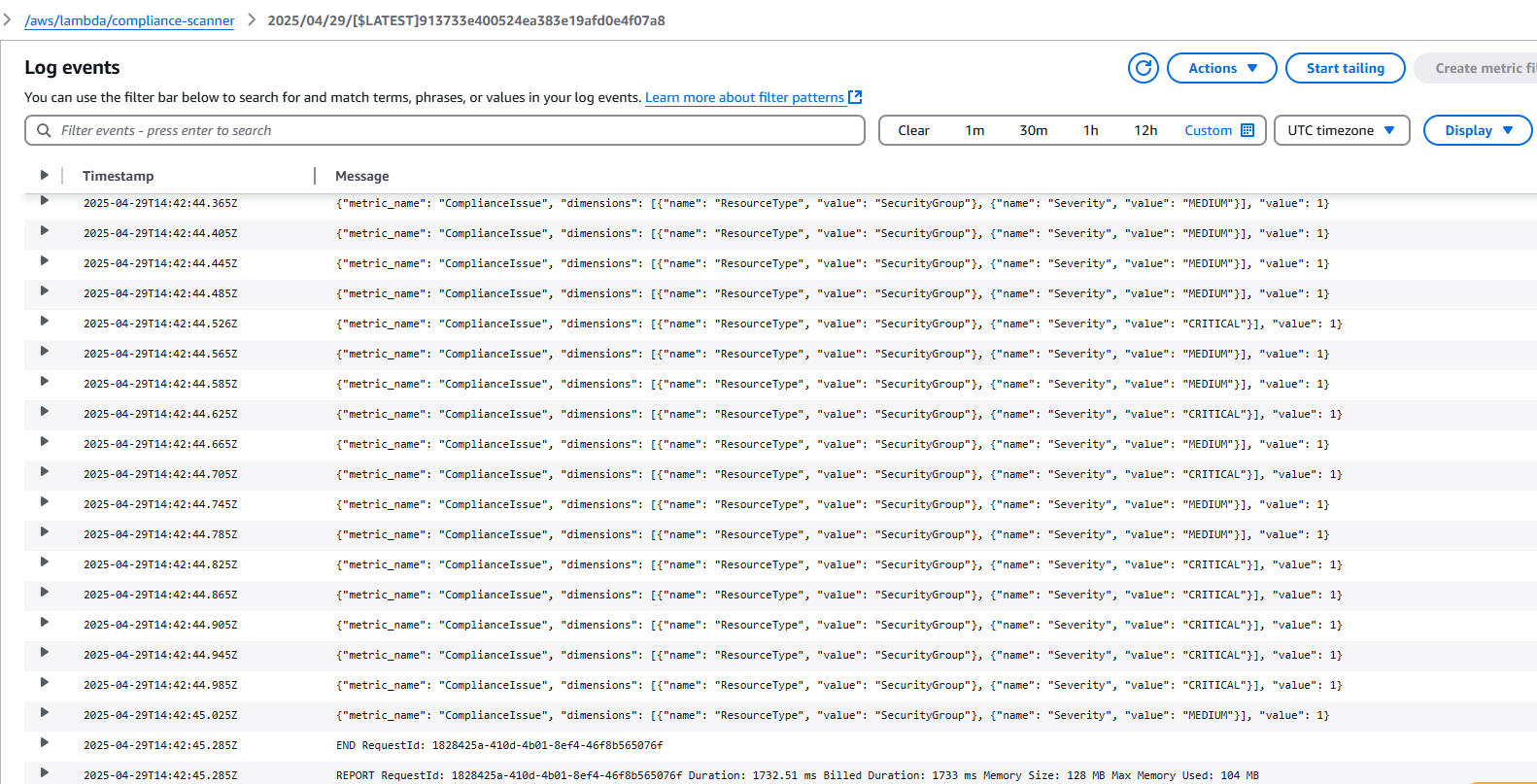
Invoke the compliance-scanner lambda function and then check the CloudWatch logs
aws lambda invoke \
--function-name compliance-scanner \
--payload '{}' \
output.json
What I Learned:
Comprehensive testing is critical to validating the deployment of serverless applications. This process underscored the importance of IAM role permissions, ensuring that each Lambda function had precisely scoped access to the resources it needed.
Phase 7: Setting Up DynamoDB Streams for Remediation
To tie everything together, I needed a reliable way to trigger scans on a schedule and in response to resource changes.
Solution:
DynamoDB Streams were enabled on the ComplianceFindings table to trigger the Remediation Lambda in real time. For each new compliance finding, the stream triggered remediation logic to resolve issues such as enabling S3 bucket encryption or blocking public access.
This ensured new resources would be scanned and remediated quickly, closing the window of vulnerability:
aws dynamodb update-table \
--table-name ComplianceFindings \
--stream-specification StreamEnabled=true,StreamViewType=NEW_IMAGE

###  Add the DynamoDB stream as a trigger for the remediation Lambda

aws lambda create-event-source-mapping \
--function-name compliance-remediation \
--event-source DYNAMODB_STREAM_ARN \
--batch-size 10 \
--starting-position LATEST
What I Learned:
Using DynamoDB Streams allowed for real-time processing of new data, making the system more dynamic and responsive to security vulnerabilities.
Phase 8: Real-Time Monitoring and Alerting
To tie everything together, I needed a reliable way to trigger scans on a schedule and in response to resource changes.
Solution:
CloudWatch Dashboards were configured to visualize custom metrics and compliance trends. Additionally, SNS notifications were set up to send real-time alerts for critical issues and to distribute compliance reports to stakeholders.
This ensured new resources would be scanned and remediated quickly, closing the window of vulnerability:
###    CloudWatch Events rule to run the scanner daily:

aws events put-rule \
    --name DailyComplianceScan \
    --schedule-expression "cron(0 1 * * ? *)" \
    --state ENABLED

aws events put-targets \
    --rule DailyComplianceScan \
    --targets "Id"="1","Arn"="COMPLIANCE SCANNER LAMBDA_ARN"

###     CloudWatch Events rule to generate reports weekly:

aws events put-rule \
    --name WeeklyComplianceReport \
    --schedule-expression "cron(0 2 ? * MON *)" \
    --state ENABLED

aws events put-targets \
    --rule WeeklyComplianceReport \
    --targets "Id"="1","Arn"="REPORTING_LAMBDA_ARN"
What I Learned:
Real-time dashboards and alerts increase visibility into compliance status and ensure that critical issues are addressed promptly. This phase highlighted how CloudWatch and SNS enhance accountability and responsiveness.
Results and Benefits
After deploying the full system to production, we saw immediate benefits:
- 85% reduction in the time non-compliant resources remained exposed
- 70% decrease in manual remediation work for the security team
- Improved visibility into security posture through the CloudWatch dashboard
- Better preparation for security audits with comprehensive reports
- Near-zero operational overhead thanks to the serverless architecture
The total monthly cost for running this system is less than $50, making it an extremely cost-effective security solution.
Future Enhancements
While the system is already providing significant value, I have several enhancements planned:
- Expanded Resource Coverage: Add support for RDS, Lambda, and other AWS services
- Machine Learning: Implement anomaly detection to identify unusual resource configurations
- Integration with JIRA: Automatically create tickets for issues requiring manual intervention
- Custom Rule Engine: Allow teams to define their own compliance rules through a configuration file
- Multi-Account Support: Expand scanning across all accounts in our AWS Organization